Axios의 Interceptors를 이용하면 then이나 catch로 처리되기 전에 요청이나 응답을 가로챌 수 있다. 따라서 이를 이용하면 Axios를 이용해 API로 통신할 때 항상 사용하는 baseURL이나 headers와 같은 부분을 한 번에 모든 Axios 요청에 관해 처리해둘 수 있다.
Axios - interceptors의 기본 구조
// 요청 인터셉터 추가
axios.interceptors.request.use(
  function (config) {
    // 요청을 보내기 전에 수행할 일
    // ...
    return config
  },
  function (error) {
    // 오류 요청을 보내기전 수행할 일
    // ...
    return Promise.reject(error)
  }
)

// 응답 인터셉터 추가
axios.interceptors.response.use(
  function (response) {
    // 응답 데이터를 가공
    // ...
    return response
  },
  function (error) {
    // 오류 응답을 처리
    // ...
    return Promise.reject(error)
  }
)
REST API의 baseURL과 headers 설정하기
예를 들어서 baseURL은 http://localhost:3000/ 이고, headers에는 Authorization과 Content-Type을 넣어줘야하는 상황이라고 가정하자.
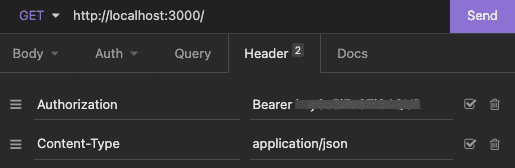
interceptors 적용 ❌
- interceptors를 사용하지 않는다면 axios를 이용한 모든 REST API 요청에서 API 주소와 필요한 headers를 넣어줘야 한다.
- 아래처럼 baseURL과 headers를 변수로 사용하더라도 항상 넣어줘야하기 때문에 귀찮을 수 있다.
baseURL과 headers를 변수로 사용
const baseURL = "http://localhost:3000/"
const options = {
  headers: {
    Authorization: `Bearer ${process.env.REACT_APP_KEY}`,
    "Content-Type": "application/json",
  },
}
get
const getData = async () => {
  await axios.get(baseURL, options)
}
post
const postData = async () => {
  await axios.post(baseURL, { data }, options)
}
patch
const patchData = async todo => {
  await axios.patch(`${baseURL}/${todo.id}`, { data }, options)
}
delete
const deleteData = async todo => {
  await axios.delete(`${baseURL}/${todo.id}`, options)
}
interceptors 적용 ✅
- interceptors를 이용해서 모든 axios 요청에 baseURL과 headers를 넣어줬기 때문에 이제 axios 요청을 할 때마다 baseURL과 headers를 넣어줄 필요가 없다.
- 예전에 interceptors를 사용하기 전에는 API 요청을 할 때 필요한 headers를 빼먹어서 에러가 난 적이 종종 있었는데, 이제는 따로 입력하지 않아도 알아서 들어가기 때문에 실수할 일이 없다.
interceptors를 이용해서 모든 axios 요청에 baseURL과 headers를 넣어줄 수 있다
axios.defaults.baseURL = "http://localhost:3000/"
axios.interceptors.request.use(async config => {
  if (!config.headers["Authorization"]) {
    config.headers["Authorization"] = `Bearer ${process.env.REACT_APP_KEY}`
  }
  config.headers["Content-Type"] = "application/json"

  return config
})
get
const getData = async () => {
  await axios.get("/")
}
post
const postData = async () => {
  await axios.post("/", { data })
}
patch
const patchData = async todo => {
  await axios.patch(`/${todo.id}`, { data })
}
delete
const deleteData = async todo => {
  await axios.delete(`/${todo.id}`)
}